Why this matters
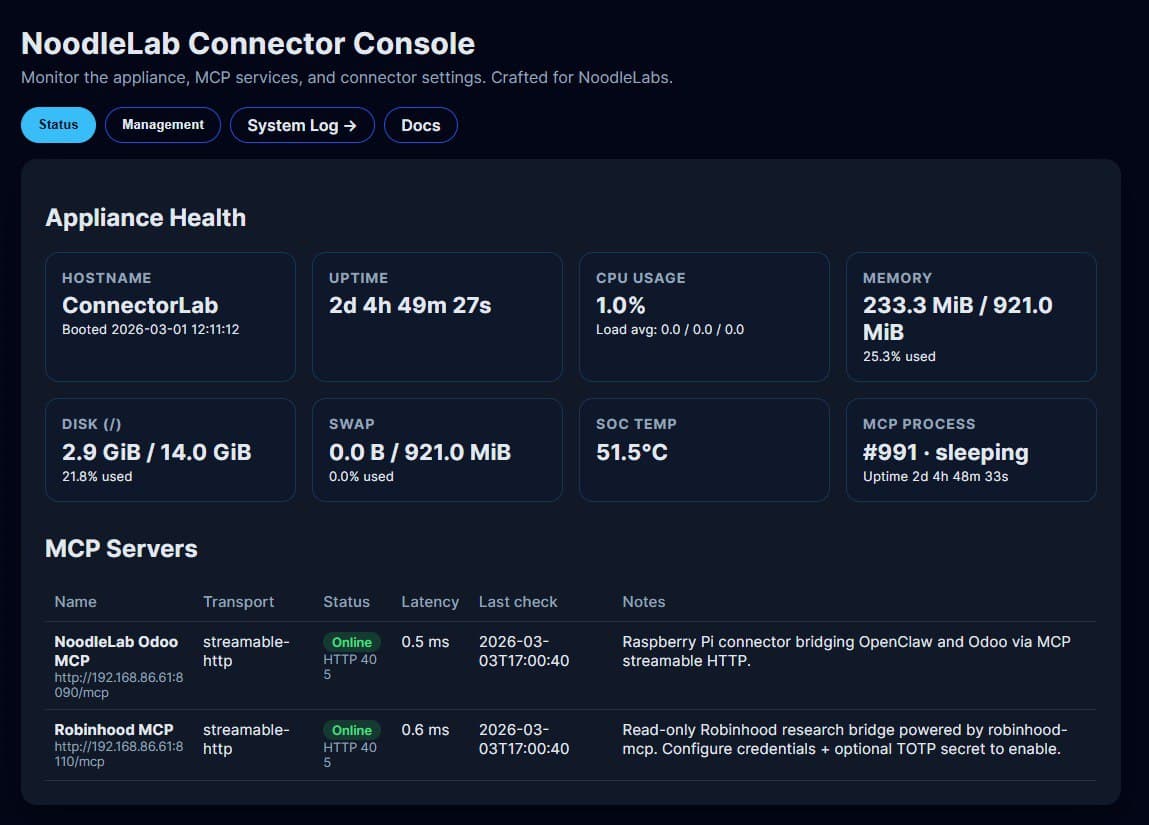
AI agents are only as trustworthy as the infrastructure they run on. When everything lived inside Odoo, updating MCP tools or verifying the appliance meant wading through a dozen tabs. The Connector Console sits beside the ERP so you can:
- See uptime, CPU, disk, and process status at a glance.
- Push new MCP tools without touching the ERP or SSH.
- Confirm every call lands in syslog with a heartbeat radar.
What shipped
- Appliance dashboard with health cards, temp monitoring, and process tracking.
- Service table showing latency, transport, and last check for each MCP endpoint.
- Syslog stream that flags anomalies and feeds radar alerts automatically.
- Config layer for toggling connectors on/off and shipping new GPT tools safely.
Why you want it
If you run automations for clients, you need proof that the agents stayed in bounds. The console provides that audit trail plus a single switchboard for updates. You get visibility, governance, and a faster path to onboard new tools without waiting on devs.
Open source + ready to fork
The entire stack lives in this GitHub repo. Clone it, run it on any Pi or VM, and swap in your own MCP servers. The console is just the first module—future releases will add rate limits, alert routing, and cross-appliance orchestration.